LUT Addon Review: Kill Chains, Brood and Dire Mobs, Contracts and 800+ Items
Last reviewed 1 November 2026 against Ecko's full LUT walkthrough and the Minecraft Marketplace listing data on Bedrock Explorer and Bedrock Universe.
- Open the guide book
- Claim the starter kit
- Find an arbiter in a village
- Finish your first contract
- Build kill chains for better loot
You clear a trial chamber or raid a pillager outpost, open the chest, and find the same handful of items you already have stacks of. After a few hundred hours, Bedrock survival loot stops feeling like a reward, and most survival addons fix that by replacing the game you know instead of adding to it.
This guide shows you exactly what you get before you spend your Minecoins: how to start, how contracts and kill chains work, every big system the addon expands, and whether the price is fair. It is built from Ecko’s full walkthrough of the addon and checked against the Marketplace listing, so you can decide if the LUT addon belongs in your next world.
Key facts
- Creator
- Logdotzip
- Price
- 1,690 Minecoins
- Released
- 27 October 2026 (version 1.0.5)
- New items
- 800+
- Rating
- 4.9 stars from 47 ratings
LUT Addon at a Glance
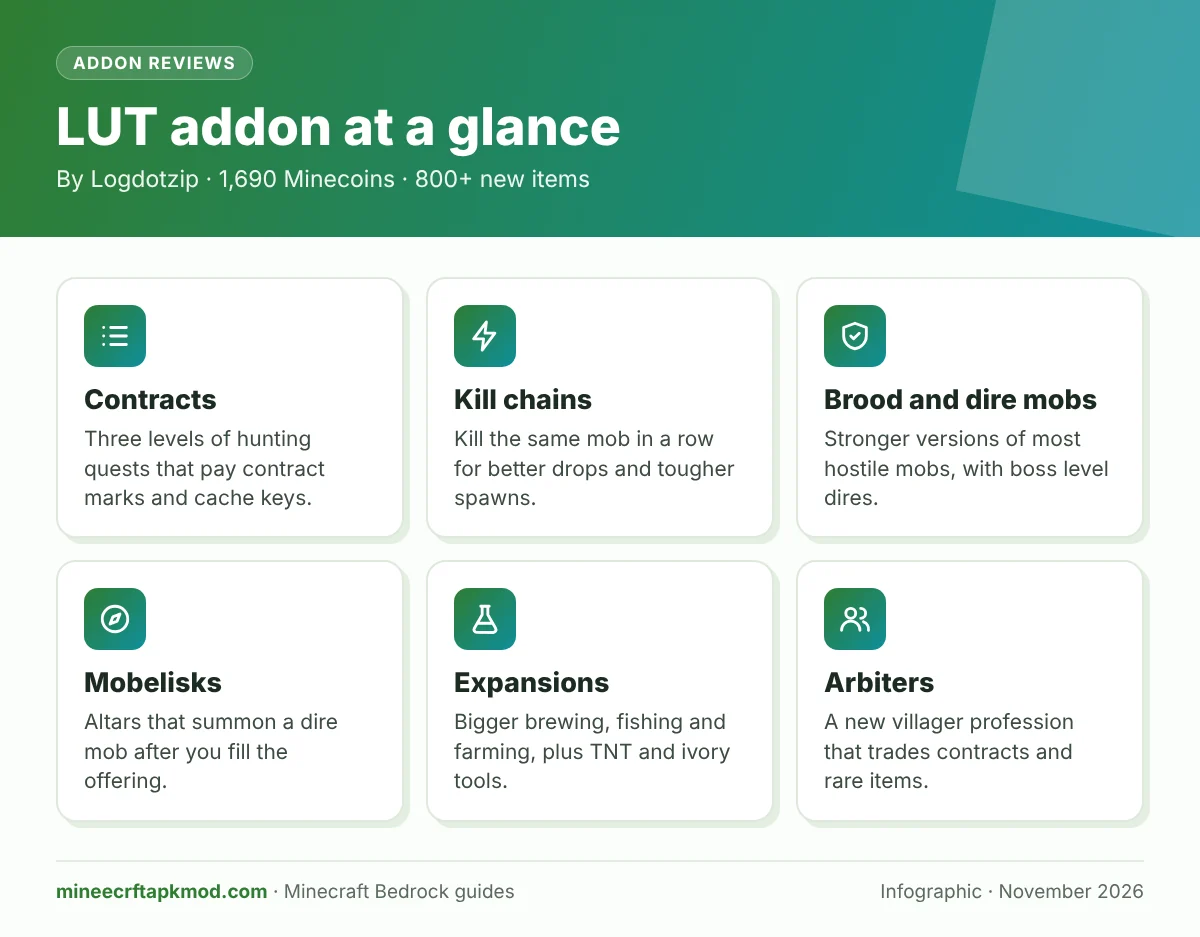
LUT, pronounced like “loot”, is a Marketplace addon by Logdotzip that keeps vanilla Minecraft survival and makes almost every drop useful. Its items also appear in normal structure chests, so trial chambers, dungeons and outposts get better without new dimensions or a new story.
| Detail | LUT addon |
|---|---|
| Creator | Logdotzip (Logdotzip Games) |
| Price | 1,690 Minecoins |
| Released | 27 October 2026 |
| Current version | 1.0.5 (Ecko tested an early 1.0 copy) |
| Rating | 4.9 out of 5 from 47 ratings, as of 1 November 2026 |
| New items | 800+ |
| Main systems | Contracts, kill chains, brood and dire mobs, arbiter villagers, compendium |
| Expansions | Brewing, fishing, farming, storage, TNT, tools |
| Edition | Bedrock only, through the Minecraft Marketplace |
The price, release date and rating come from the Marketplace data shown on Bedrock Explorer and Bedrock Universe. Ratings move every day, so check the in game store before you buy.
How to Get Started With the LUT Addon
Ecko spent more than a day learning the addon before recording, and even then he says he missed things. The fastest way in is to follow the order the addon itself suggests: guide book, starter kit, first contract.
The Guide Book and Its Settings
You receive the guide book as soon as the addon is active in a new or existing world. It holds the starter kits, the compendium, an overview of every system and a settings page that is worth reading before you play.
- Mobelisk spawning: turns the mini boss altars on or off.
- Compendium notifications: alerts when you unlock a new entry; useful early, noisy later.
- Kill chain alerts: chat messages as your chain grows.
- Offhand equip: lets addon items sit in your offhand with a single left click.
- Sneak for compendium: hold sneak for two seconds to get a replacement compendium.
- PvP toggle and tooltip length (full, short or none).
The Custom Offhand Slot
Bedrock only allows a short list of items, such as shields, totems and arrows, in the offhand. LUT adds its own offhand system for its items, so you can hold the guide book or a compendium there and right click any item to read what it does and where it comes from.
The Starter Kit: Hunter Bundle and First Contract
The starter kit page hands you a hunter bundle and a level one contract. While the hunter bundle is open, hostile mob drops such as rotten flesh go straight into it instead of filling your inventory.
The Craftable Compendium
If you only want the item tracker, combine the guide book with a name tag to craft a standalone compendium. Ecko’s copy already listed 295 entries across items, mobs and blocks, and it also shows what you are carrying and the entries you looked at most recently.
Arbiters: The New Villager Profession
Arbiters are the heart of the addon’s economy. Their small structures already appear in most villages, and they change style to match the biome, from taiga and savanna to snowy villages.
Arbiter Structures and the Arbiter’s Cache
Each structure holds an arbiter’s table, which lets a jobless villager become an arbiter, and an arbiter’s cache. The cache opens with keys and gives the best treasure in the addon, but it cannot be crafted, so it only exists inside these structures.
What Arbiters Trade
Arbiters sell contracts, mob incense and other progression items. Different arbiters stock different goods, and the better trades cost contract marks or brood spores instead of emeralds alone, so a second arbiter in another village is worth finding.
Save the coordinates of the first arbiter structure you find. Its arbiter's cache cannot be crafted, so it is where you will open every key you earn.
Contracts: Your Main Progression Path
Contracts are the addon’s quest system. Every player starts with the same one, “kill five zombies”, and finishing it pays out contract marks and a cache key piece.
Levels, Aspects and Conditions
Contracts come in levels one, two and three, and the higher ones can take several in game days. They add aspects that change the targets and conditions that limit when kills count.
In Ecko’s level three contract, the phantoms were fireproof, so his Fire Aspect sword did nothing extra. The condition only counted kills between midnight and sunrise, and phantoms killed outside that window did not count at all.
Rewards: Contract Marks and Cache Keys
Contract marks are a currency for arbiter goods, contract tools and other rewards. Cache key pieces turn into keys for the arbiter’s cache, and arbiter keys from stronger targets unlock noticeably better loot.
Pausing, Abandoning and Resealing
You can pause a contract and come back later, or abandon it completely. You cannot simply throw a contract away, though, so use a resealing scroll if you want to store one in progress.
Rites, Seals and Contract Tools
A long list of items bends the rules of a contract. A rite of cooperation lets nearby friends help with your targets, while other rites remove aspects and conditions, reroll them, or raise the chance of brood and dire targets.
Seals boost a single contract with extra damage, extra experience, or health and hunger stolen from targets. Ecko also used a ring that makes target kills count extra, which finished a two skeleton contract with a single kill.
Kill Chains Explained
A kill chain grows each time you kill the same type of mob. The longer the chain, the better the drops and the higher the chance that a stronger brood or dire version spawns, so a chain is both a reward and a risk.
How a Chain Builds and Breaks
You can kill one mob of another type and keep your chain. Kill a second off chain mob, though, and the chain resets, which Ecko showed by switching from husks to zombies and back.
Chain Items
- Ascension chain: kills count double toward your chain.
- Exclusion chain: keeps your current chain safe while you kill other mobs.
- Chain tracker: shows your current chain number when you hover over it.
With the exclusion chain on, Ecko held a husk chain of 12 while fighting other mobs, and later pushed a chain past 60. Expect a steady stream of brood mobs at that point, so bring real armor.
Long kill chains raise the odds of brood and dire spawns. A dire mob in a fresh world can end a run fast, so build up armor before you chase a big chain.
Brood and Dire Mobs
Brood and dire mobs are stronger versions of normal mobs. They hit harder, take more punishment and drop the addon’s rarer crafting materials.
Brood Mobs
Brood versions exist for most hostile mobs in the Overworld and the Nether. Ecko’s list included zombies, husks, drowned, skeletons, strays, bogged, spiders, creepers, endermen, witches, pillagers, vindicators, evokers, ravagers, phantoms, slimes, magma cubes, ghasts, guardians, piglins, zoglins and zombified piglins.
In Ecko’s tests the brood creeper exploded more than once, and brood evokers summon minions. They often drop brood spores, which arbiters accept for special trades.
Dire Mobs
Every brood mob also has a dire version, which works like a boss. Dire mobs come from long kill chains, from mobelisks and from contracts, and a dire mob in a fresh world will be a real struggle.
Some dires protect themselves with chains or minions. The dire phantom Ecko fought could not be damaged until every one of its chains was broken, and it threw a constant stream of phantoms at him.
Dire Heads
Every dire drops a head. Wear it and that dire type is weakened against you, which makes repeat fights much easier.
Mobelisks: Mini Boss Altars
Mobelisks are altars that appear naturally in the world with a sound when one spawns. There is no locate command for them, but Ecko often found them near villages.
Each mobelisk asks for an offering, bones in Ecko’s case, and breaks once you fill it. A dire mob takes its place, and beating it pays out better loot than normal fights.
A mobelisk compass points you toward the nearest altar when activated. It has limited uses, so save it for when you actually want a boss fight.
Loot Caches and Keys
Cache key pieces and keys drop from contracts and stronger mobs. Higher level targets give better keys, and an arbiter key produces noticeably better loot than a basic cache key.
Ecko’s first two keys gave him the ascension and exclusion chains, a repair kit, an undead siren and a damaging charm. That is the loop of the whole addon: harder fights, better keys, stronger tools.
Brewing Expansion
Brewing gets one of the biggest upgrades, and Ecko called it a favorite. The addon adds hundreds of potions, and you can browse them all through the recipe book.
Gold Flakes: Straight to Level II
Gold flakes drop from piglins and appear in ruined portals and Nether structures. Brew them in and a potion jumps straight from level I to level II, which Ecko believes the addon calls a mighty potion, skipping the usual extra steps.
Pectin and Combined Potions
Pectin drops from witches and is one of the most useful items in the addon. Brew it into a potion to make it stable, then add a second potion to merge both effects into one bottle.
Some combined potions also turn up in chests. Ecko found a potion of agility, with jump boost and speed, and a potion of buoyancy, with slow falling and water breathing.
Flasks and Serums
A flask lets you drink the same potion more than once, with the same effect and length each time. Ecko found the serum’s exact effect hard to pin down, so test it in creative before you rely on it. Our Minecraft potion chart covers the vanilla recipes these build on.
Fishing Expansion
Fishing was Ecko’s favorite part of the addon. Five baits go in your offhand and change what you catch.
| Bait | How to get it | What it does |
|---|---|---|
| Earthworm | Till grass blocks | Always catches a fish |
| Chum | Offcuts, rotten flesh, earthworm and bone meal | Can catch several fish at once |
| Sticky bait | Crafted | Favors items over fish |
| Shimmer bait | Crafted | Attracts the two new fish, oily fish and mineral fish |
| Heavy bait | Crafted | Sinks deeper and can pull up rare caskets |
The Processing Knife and Offcuts
An iron processing knife cuts fish into offcuts, the base for chum. Cutting the new fish gives scales, which feed into several farming and crafting recipes.
Caskets and Rare Catches
Heavy bait is harder to use because the bobber sinks, but it is the only way Ecko found to pull up a casket. Fishing also turned up a scroll that teleported him to a recently visited arbiter and a fishing rod with Mending.
Farming and Husbandry
Farming adds a manure loop that makes crops and animals almost run themselves. It starts with a straw pile.
Straw Piles, Manure and Enriched Farmland
Animals standing on a straw pile sometimes leave manure. Use it on farmland, or craft an enriched block, and crops near water and light can drop extra items such as carrot tops and potato peels.
Animal Feeders and Crates
Those extra crop items go into an animal feeder, which feeds animals and puts them in love mode on their own. Breeding stops once a pen gets crowded, and a crate lets you pick up a farm animal and move it.
Eternal Seeds and Night Plants
Eternal seeds replant themselves after you harvest, made from a crop item, manure and scales. The addon also adds plants that stay harmless by day and turn deadly at night, which work well as mob traps.
Censers: Spawn the Mobs You Need
Censers burn mob incense to spawn chosen mobs near you while they sit in your offhand. Sneak and use one on a mob to attune it, then set the burn rate: faster burning means more frequent spawns.
They come in copper, silver and gold. The gold censer can hold a primary and a secondary mob, which Ecko set to zombies and spiders to feed a kill chain even in daytime.
Mob incense comes from fishing, trading, chests and drops. Stock up whenever you can, because every censer needs it.
Vessels, Pouches and the Hunter Bundle
Vessels burn common drops for combat effects. Only one can be active at a time, and you turn it on by sneaking and interacting.
- Putrid vessel (rotten flesh): zombie arms grab mobs and sometimes drag them under.
- Bone vessel: mobs you hit can be weakened.
- String vessel: traps mobs in cobwebs.
- Gunpowder vessel: causes explosions, so keep your distance.
Pouches store hundreds of a single drop and pick it up as you walk over it. There is a brittle pouch for bones, a tangled pouch for spider eyes, a volatile pouch for gunpowder and a putrid pouch for rotten flesh, all made with sturdy hide.
Charms, Runes, Hexes and Tomes
These items add passive power from your inventory. Many of them stack, so carrying several copies raises the odds that they trigger.
Charms
Charms give your attacks a chance at extra effects such as fire, extra damage or freezing. Ecko set mobs on fire without a Fire Aspect weapon because flame charms were in his inventory, and he recommends charms for the Wither and the Ender Dragon.
Runes
The absorption rune can grant bonus hearts after a kill, and the protective rune can add defense when you take damage. The ravenous rune turns incoming damage into hunger loss, so a ravager charge only drained Ecko’s food bar.
Hexes
A hex makes new mob spawns more likely to match the mobs you recently killed. It is ideal for long kill chains, but turn it off when you want normal spawns back.
Tomes and Pages
One tome takes durability damage in place of your gear, and another turns mob drops into experience. Pages work on enchanted books: one removes curses, one splits a book into single enchantments, and one can raise an enchantment level, sometimes adding a curse.
TNT Expansion
A soul fire propellant in your offhand lets you throw TNT. Enriched TNT comes in stronger levels with longer fuses, and fuse powder lets you lay a trail for delayed blasts.
- Pyro TNT: burns away trees and plants without damaging the terrain, perfect for clearing a jungle.
- Phase TNT: teleports everything it blows up into your inventory.
Ivory Tools
Ivory tools come from tusk fragments dropped by hoglins. They break blocks very quickly, like gold tools, but the blocks do not drop.
That makes them ideal for clearing terrain, but never use the ivory pickaxe on ores: you get the experience and lose the drop. Containers such as chests are protected, and an ivory chisel turns blocks into slabs.
Illager Codex and Monolith
Illager sigils drop from illagers and repair broken codexes found in the world. A repaired codex gives combat powers: evoker fangs on left click with a cooldown, stronger arrows, or extra damage when your health is low.
An illager monolith summons illagers and ravagers for a while. Ecko notes it is built for kill chains, and it is how he farmed sturdy hide.
Utility Items Worth Hunting
Dozens of small items solve everyday survival problems. These are the ones Ecko rated highest.
| Item | What it does |
|---|---|
| Repair kit | Fully repairs one item, but only once per item |
| Ender rift | Opens a portal back to your spawn, with a cooldown |
| Torch dispenser | Places torches in dark spots as you move (regular, soul or copper torches) |
| Thief’s glove | Takes a mob’s drop without killing it, once per mob |
| Death bundle | Keeps up to a stack of items when you die |
| Resurrection collar | Saves a pet from death, like a totem for pets |
| Drop boosting bracelet | Raises the chance of mob drops, handy for ender pearls |
| Arbiter’s leech | Heals you based on the damage you deal |
| Arbiter’s quiver | Arrows that hit split into more arrows |
| Arrow attractor | Missed arrows can fly back to you |
| Impact jelly | Cuts fall damage if eaten just before landing |
| Knapsack | Lets you sleep during the day |
| Phantom eye | Gives a bird’s eye view for a short time |
| Infernal talisman | Smelts drops automatically, such as logs into charcoal |
| Ravager riding gear | Attach it to a stunned ravager to ride it into fights |
Is the LUT Addon Worth 1,690 Minecoins?
For survival players who want a reason to fight, fish and farm, yes. Ecko, who reviews addons every day, called it possibly the best survival enhancement he has checked out, and its 4.9 star Marketplace rating backs that up.
What We Like
- It adds to vanilla instead of replacing it, so your world still feels like Minecraft.
- Every drop gets a purpose, from rotten flesh to witch pectin.
- Contracts and kill chains give survival a clear progression loop.
- Clear in game help: the compendium explains every item.
- Settings let you tone down alerts and turn off mobelisks.
What to Know First
- At 1,690 Minecoins it is one of the pricier addons; the 1,720 Minecoin pack covers it.
- The learning curve is steep, and the guide book will be your best friend for the first few days.
- Dire mobs are tough in a new world, so build up gear before chasing long chains.
If you enjoyed big survival overhauls like our RLCraft addon guide but want to keep the vanilla feel, LUT is the better fit. For lighter automation, compare it with the Factory addon.
Watch the Full LUT Walkthrough
Ecko’s video covers every system in this guide over almost two hours, recorded with early access to the addon. It is the best way to see contracts, kill chains and the dire fights in action.

LUT addon full walkthrough by Ecko (ECKOSOLDIER)
Our install guide shows how to activate behavior and resource packs on every device. It also covers the errors you are most likely to see.
LUT Addon FAQ
These are the questions players ask most before buying. Each answer comes from the walkthrough and the Marketplace listing.
How much does the LUT addon cost?
It costs 1,690 Minecoins on the Minecraft Marketplace. The 1,720 Minecoin pack covers it with a few coins to spare.
Who made the LUT addon?
LUT was made by Logdotzip, also known as Logdotzip Games. They also publish addons such as Trader Expansion and Death Animations, and they run a dedicated YouTube channel with LUT tutorials.
Does the LUT addon replace vanilla survival?
No, it adds to it. Its items appear in normal structure chests and mob drops, and every vanilla system stays in place.
Can friends help with LUT contracts?
Yes. A rite of cooperation lets nearby players count their kills toward your active contract.
How do I stop the kill chain messages?
Open the guide book settings and turn off kill chain alerts or compendium notifications. Ecko kept them on while learning and turned them off later.
Does the LUT addon work on Java Edition?
No, it is a Bedrock Marketplace addon. It works on Bedrock platforms with Marketplace access, and our addon install guide shows how to activate packs in a world.
You now know what every LUT system does, how to start without getting lost, and what 1,690 Minecoins actually buys you. If your survival world needs loot that is worth chasing, buy it from the Marketplace, open the guide book first, and save the coordinates of your first arbiter.