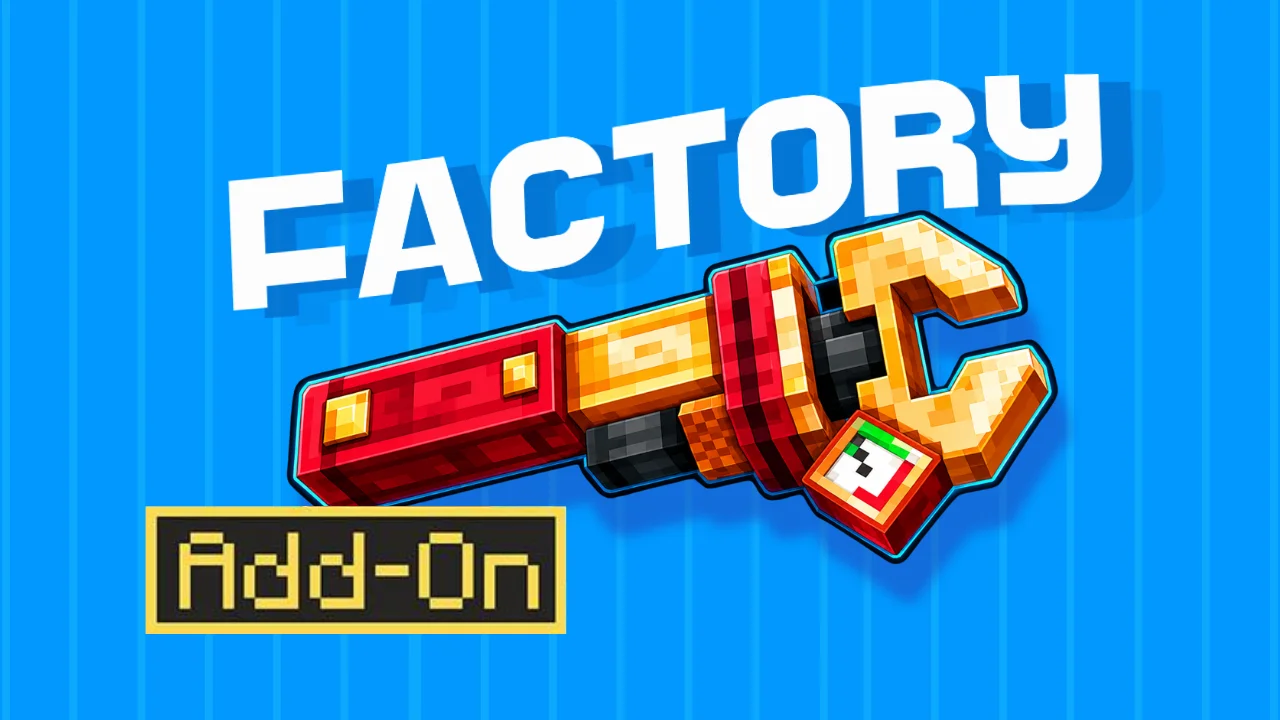
Automating tasks in Minecraft is easy and useful and this concept has been extended in the new ‘Factory add-on’ introduced by the unlinked, the same creative mind behind essential add-on.
The add-on is for Minecraft bedrock edition and costs about 990 minecoins which is $7,by the way, its cost would increase to 1020 minecoins in a few days. However, you can simply get it from the Minecraft marketplace.
In this enjoyable post we will get to know its features, how to download it, and everything you need to know before getting in the game.
Is Factory Add-on one of the most extensive add-on for automation in Minecraft ?
Yeah, it is the most extensive and broader addition for a Minecraft world as it has brought us up with machines such as auto crafting table, automatic block breaker, block placer and much more, allowing us to automate harvesting, filtering and sorting, crushing and smelting ores, and crafting, making these the reason why it has been well complimented by Minecraft bedrock players. Although it is new, it has already been rated 4.7 stars on Minecraft marketplace comparatively higher than its competitor Auto Factory add-on’s rating. Plus point, it supports recipes from about 100 other addons, slightly adding more value.
Its file size is 17 mbs and just after you download it and import into the packs in the world settings, you can simply locate your world.
First of all, you will see two things in your inventory, factory bluepreints and factory guidebook.
Factory Blueprints
One of them is ‘factory blueprints’ which have every automation from advanced to basic ready made, however, it is just a holographic view and it will not work, but by seeing you can create the whole system by placing matching things in same place, which the add-on has made easier for the player to know how automation systems works. You can practically try it for a better understanding.
Factory Guidebook
The other is the ‘factory guidebook’, as you click on the guidebook it shows two buttons, info and settings.
Settings Button
Inside settings you would see two following toggles, which one of them asks to on/off the sneak and interact reminders, which means that it will give reminders that if it is necessary to sneak for performing any task, the button will not on if not sneak while clicking it or when any machine is in front of you it will say click here or anything else. These reminders are pretty much useful, so I think keeping them on would be better.
The other one allows you to set the add-on volume, as sometimes players don’t like constant machine sounds. I consider keeping it on 100 as well.
Info Button
Moving on the info button in the settings which is very important, as it will guide you throughout your whole journey using this add-on. As you click it, it shows more buttons including, introduction, how to get started, crafting resources, and all machines one after another.
All the sub buttons starting from the top till end are steps which are necessarily to be followed and we will read and practise the action each of it said.
Introduction switch says:
This add-on ends the need for redstone mechanics as the newly implemented mechanics have advanced your automation, crafting is automatic, trash filtration is automatic too and breaking blocks is automatic on the same line.
Lets Get Started:
The most important starting resources are rubber and iron. Our first step is to make rubber. Rubber can be made by smelting slime balls, jelly, or resin. However, jelly is the easiest of ingredients to get, just by placing rotten flesh in a crafting table and spider eye on its right, so I always consider using it.
Crafting Resources:
Following the crafting resources include roller, gear, spike, hammer and power shafts and we are going to check out each one’s recipe. Starting from the roller, for which you need 2 iron ingots, you can easily craft it by placing one iron and another just above it.
Then comes gear which has 4 levels, wooden, stone, iron and diamond. For wooden gear, in a crafting table, you need to place one stick in the first row, second column, one in the second row, first column and one in second column, third column, and last on in third row, second column. For stone gear you have to place stones in the same pattern as sticks and wooden gear in the middle. For iron gear you have to place iron ingots in the same way you placed sticks and stone gear in the middle. For diamond gear, you have to place diamonds in the same way as you placed sticks and then iron gear in the middle.
Now the spike, for them you are going to place 3 amethyst shards in the crafting table on the first column, then 3 slimeballs in the second column, and at least 3 iron ingots in the third column.
Next one is hammer, the recipe of which is similar to iron pickaxe. For crafting it, in the crafting table, place 3 iron ingots and 2 sticks in the pattern of pickaxe and then just put one iron ingot in the left row, second column and one iron ingot in the right row, second column.
Here comes the iron plate which you can simply craft by placing a hammer and one iron ingot on its right side in the crafting table.
The very next one is the power shaft, which can be crafted by placing one iron ingot in the left row, one copper in the middle row, and one iron ingot in the right row.
However, you can easily see every recipe in the crafting table by searching the item’s name in it.
Moving on Machines
Conveyors
Conveyors are machines which can move items from one place to another and are almost essential for connecting many machines with each other. You just have to throw your items on it and it will start to move in the direction it is set to go.
Conveyors stop if you walk on them while sneaking. However, if you sneak and place a conveyor, the direction of the conveyor will change to the opposite side.
Conveyors have two types: simple conveyor and connecting conveyor. A connecting conveyor has the ability to be connected up, down, and sideways with other conveyors while the simple conveyor cannot move up and sideways, and can only be connected in a straight direction.
However the simple conveyor can move your items sideways without being connected, which feels like a glitch, but really a glitch.
You can craft a connecting conveyor in a crafting table, by placing 3 rubber in top layer, 3 rollers in middle layer, and 3 rubber in bottom layer. Like this:
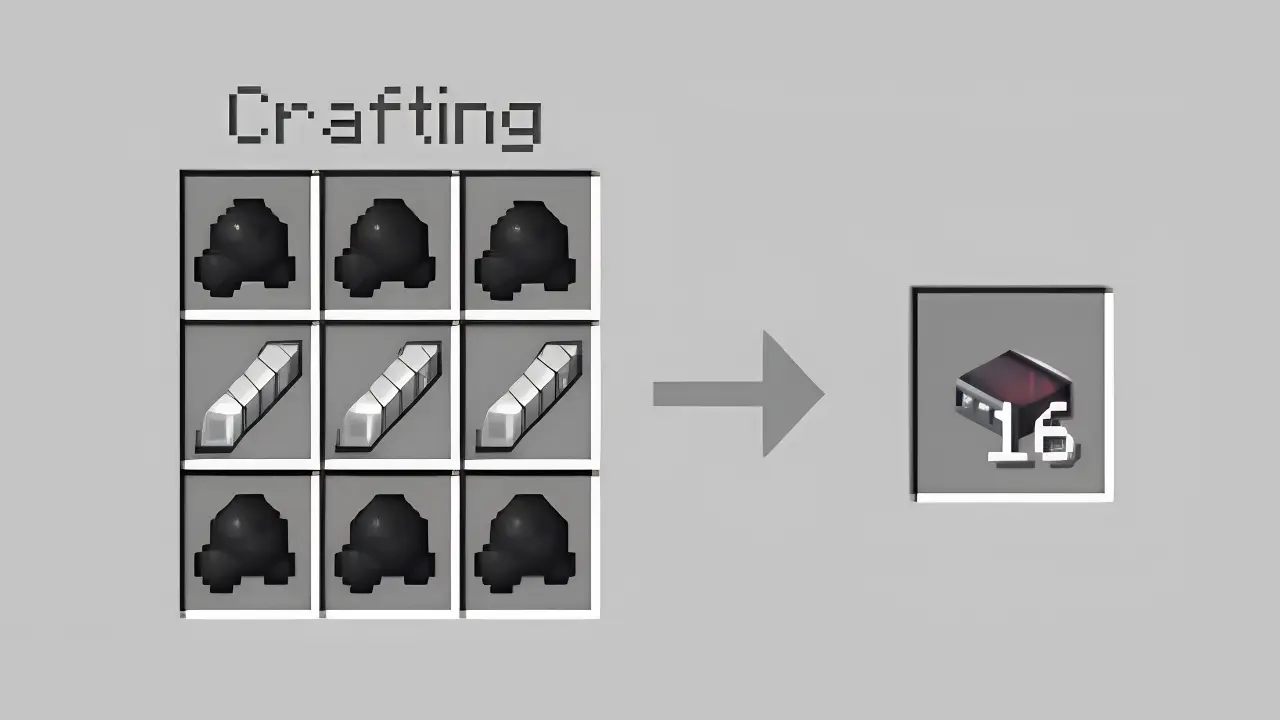
You can craft simple conveyors by just placing your connecting conveyors in a crafting table.
You would think why a simple conveyor is here, when the connecting conveyor can perform all tasks ? and same everyone thinks too.
Conveyor Filter
Conveyor filter is a machine which automatically keeps the items which you have set to keep and removes which don’t match that specific item. You can make it by placing 4 iron ingots, 2 redstone comparator, 1 observer, 1 golden pressure plate and 1 connecting conveyor like this:
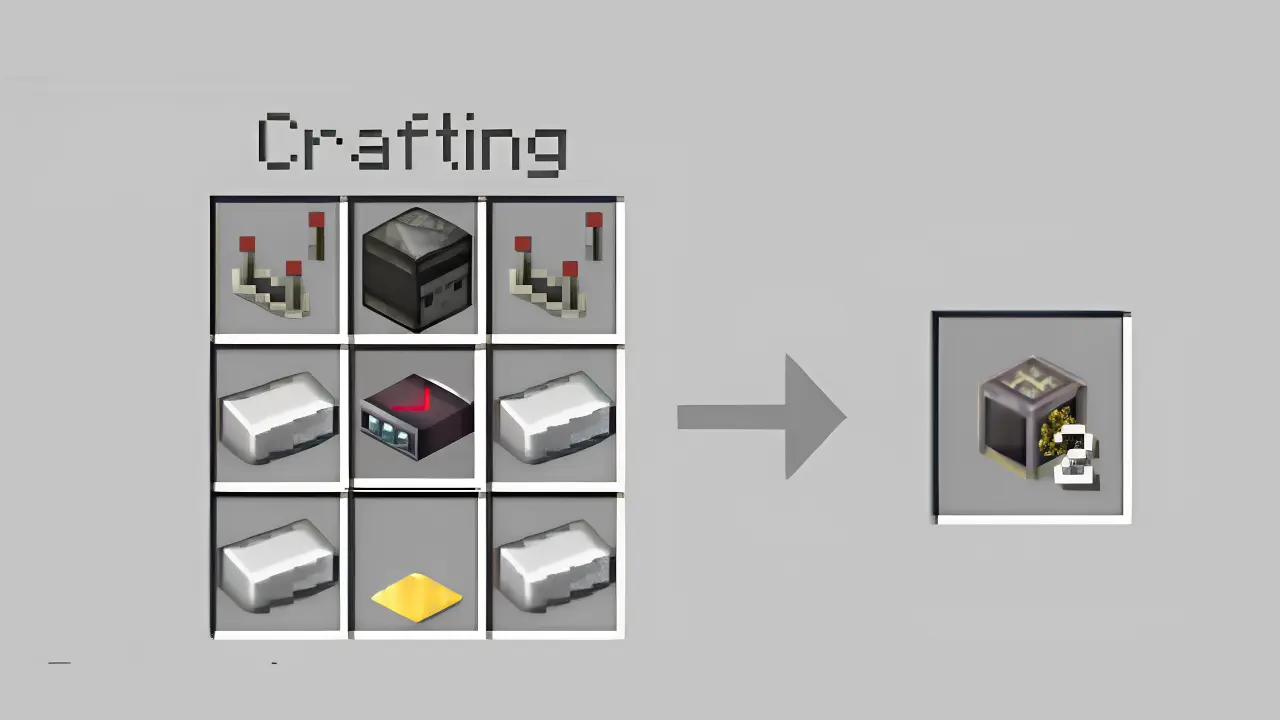
For setting it up, you have to place it on the side of other conveyors which are bringing the specific items you want to filter
After it is attached, you have to place the item you want to keep in the item frame which is already on it and your machine is ready for filtering your items.
If you want to keep more than one item, you can place a chest above the conveyor filter and place whatever items you want to keep, if you do this the conveyor filter will ignore the item in the frame and will only keep the items you placed in the chest.
If you want the useful stuff forever, you can put lava underneath the side where your conveyor filter is dropping it.
Assume you have a spawner xp farm, a mob spawned, you killed it, and then the output is arrow, rotten flesh and string and you only wanted arrows, you placed hoppers where the mob falls, then a chest under it, a hopper again but this time under chest, and a dropper under chest, just where the dropper drops this stuff you placed a conveyor, and with conveyor is attached a conveyor filter. Now your arrows automatically get dropped on another side and the rotten flesh and string on the other side. That’s a complex example, however, that’s how it works.
Conveyor Diverter
Recipe of conveyor diverter is 2 redstone lamps, 1 observer, 2 redstone torches, 1 connecting conveyor, 2 iron ingots and 1 golden pressure plate, in a crafting table, like this:
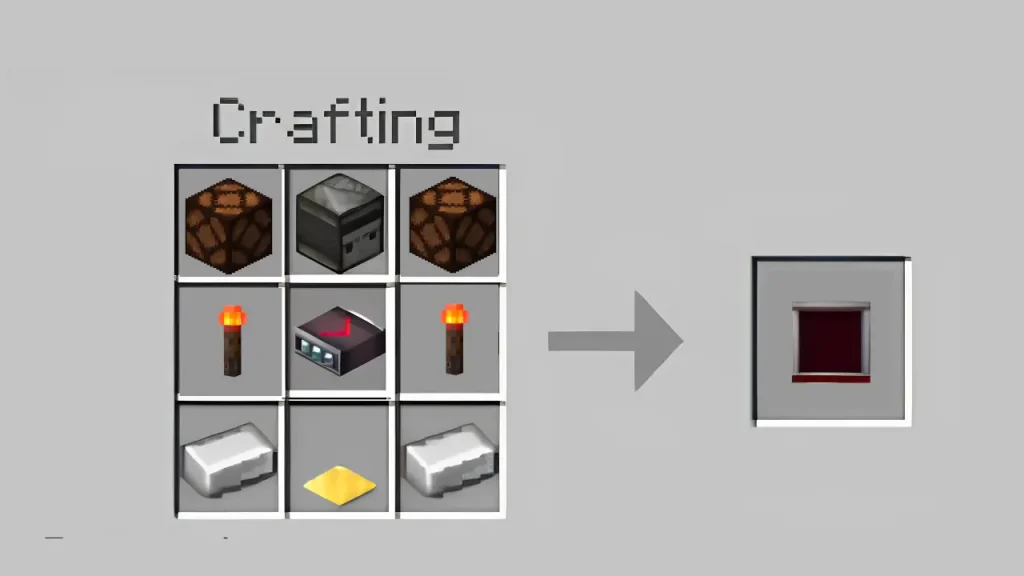
Conveyor Divertor is another machine, looks and works similar to conveyor filter, however, it has some differences in its function. It sends the coming items to different directions, particularly, right or left.
For setting it up, you have to place it on the side of the conveyors which are bringing your dropped stuff which you want to separate. Then you have to put conveyors on both sides of the conveyor diverter, basically one is required on both sides but you can simply place as many conveyors you want on the sides.
After you set it up, it is ready to separate your stuff. Now listen, the thing which will first drop on the conveyor with which you have placed the conveyor diverter will go to the right and the second time you drop the thing will go left. This will be the pattern, first item right second item left.
Just where your items drop, you can place a hopper and chest underneath. This will collect your items in a chest.
Water Wheel
Here comes the water wheel, a machine, which generates energy when its paddles move. This energy can be used to power other machines (quarry and crusher) that need external energy.
Lets make it first, place 4 sticks, 4 oak slabs (or slabs of any wood), and one power shaft like this:
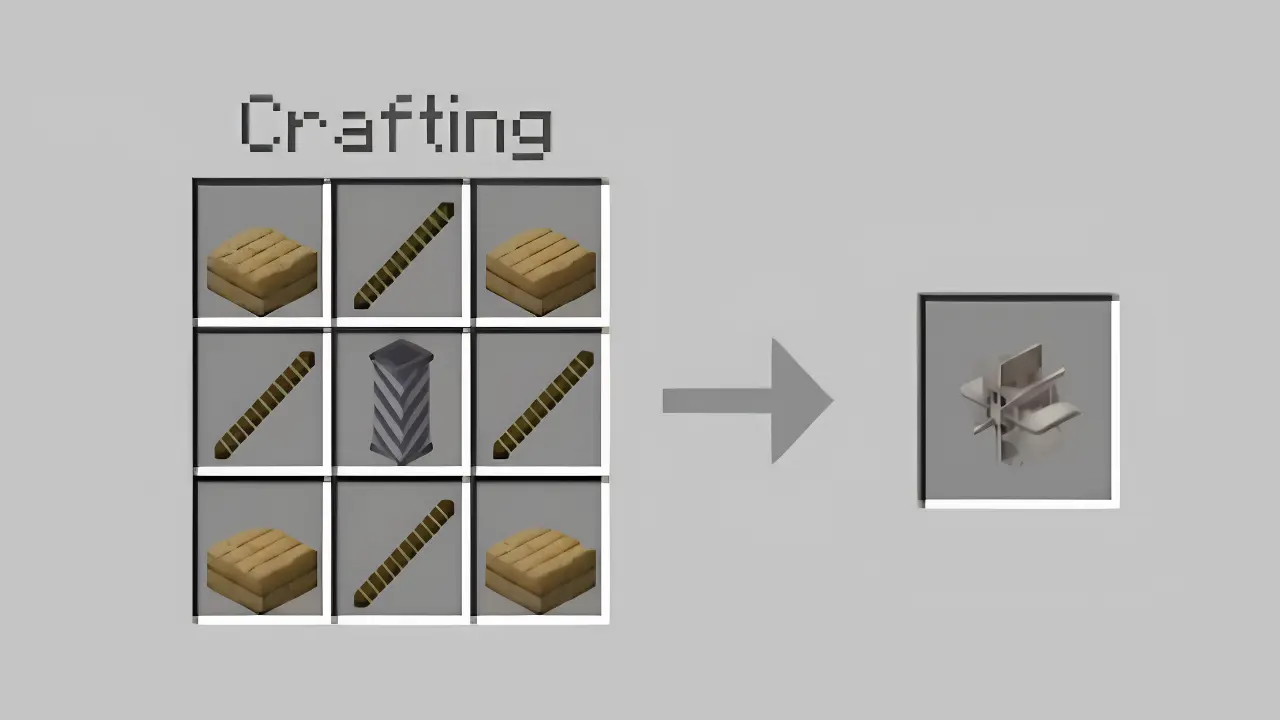
To make it work, you have to place a block, on its front side place the water wheel, on the right or left side of it place four blocks above each other, place water on top block and its paddles will start to move.
For transferring energy to crushers and quarries you have to simply place a gear box on its side, you would be thinking what gear box is, see below to know. However, then attach a shaft on its side and now you can attach any machine you like.
Plus, the shafts cannot turn so if you want to turn your shaft to any other side, you would have to attach another gear box.
It plays an important part in creating an external power system, for making it you have to scroll a little down.
Click here for navigating to the information and recipe of the gear box.
Click here for navigating to the information about quarries and here for crushers.
Windmill
Moving on, wind mill, a machine, which is too used for generating external energy for quarries and crushers and easier compared to water wheel for making energy.
Lets make it first, place 1 power shaft in the middle, and 8 iron plates around it, like this:
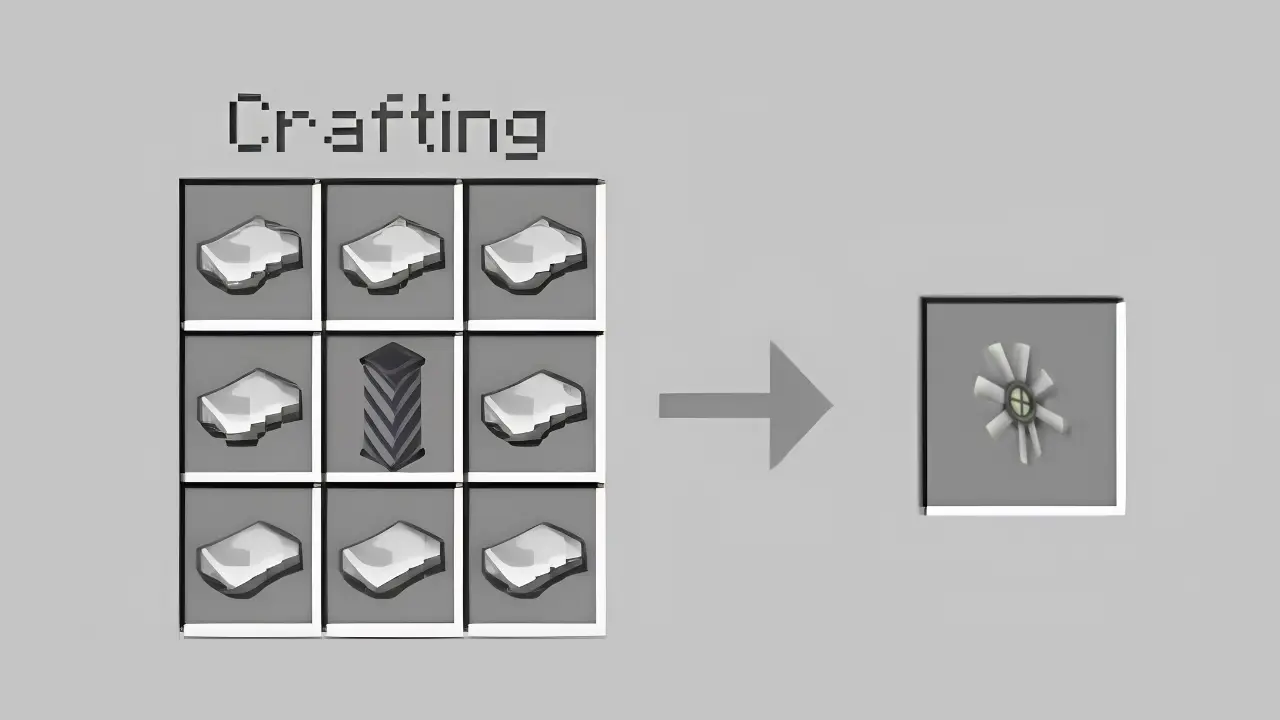
It is important to set up just like I do or it will not work.
First place one gear box on any point and place 10 shafts on the top of the gear box. Then, place another gear box on the top of the shafts and place one windmill on each of its sides.
Now come down, and you can simply place one or more shafts, and then connect a machine which needs external energy.
However, one of these systems is not going to run a machine, the machine needs more energy. Estimately, you can try repeating it 3 times one after another, connecting them all from their main power shafts to one gearbox for running a crusher, whereas, for running quarry, you have to repeat it six times.
Using only windmills or water wheel systems separately for energy can work, but attaching both of them, some that and some those, make your energy setup look better.
Later in this delightful blog, we will also make a full energy setup together, with both water wheel and windmill systems which will provide enough energy for any of the both machines.
Block Breaker
To make a block breaker you need 1 piston, 1 shaft, 1 premial fire ( 4 flint and steel and 1 lava bucket ), 2 iron ingots, 2 redstones, 2 copper ingots. Arrange in crafting table like this:
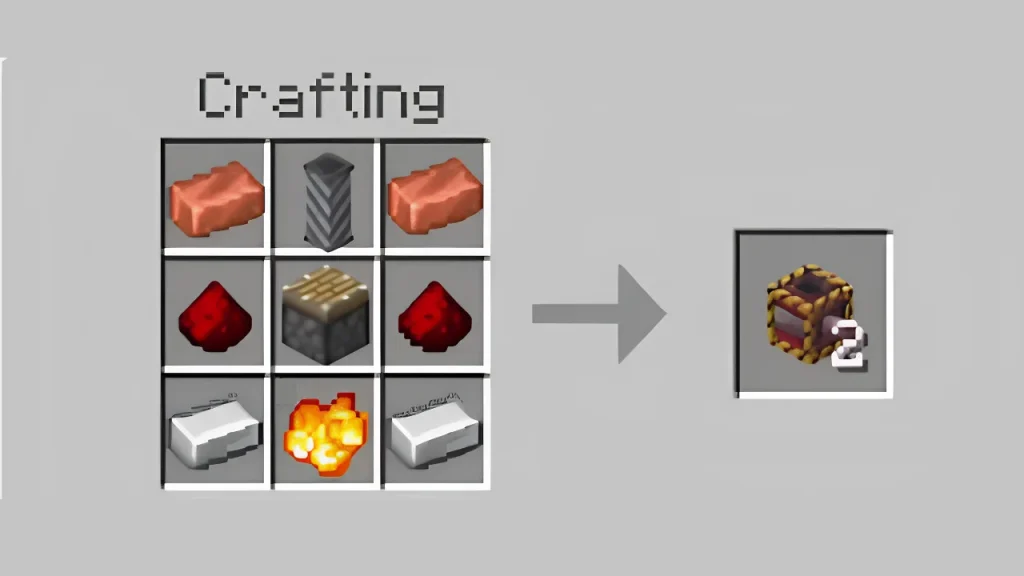
The Block Breaker is a machine which automatically breaks the block placed in its right side, left side, front side, back side, above or downside. Any broken blocks will be dropped on the opposite side of where the block has been broken.
You can place an item frame on a side of the block breaker and put a block inside the frame. The Block Breaker will then only break blocks that match the item shown in the frame. You can also place a chest on top of the Block Breaker. In that case, it will only break blocks that match the items stored inside the chest.
Additionally, if there is no chest placed on top of the block breaker, it can also damage mobs and player standing in front of it.
Another feature, if you place a chest on a block breaker and fill it with empty bowls or buckets, the block breaker will start to milk the cow or the red cow which comes near it.
It is essential for making setups like cobblestone generators. Honestly, its features are interesting and is one of the great machines in this add-on.
Rocket Furnace
It is a machine with the same use as the normal furnace, however, it is slightly different. For making it you need a bellow, fire chamber, and some iron plates. Now place these like this:
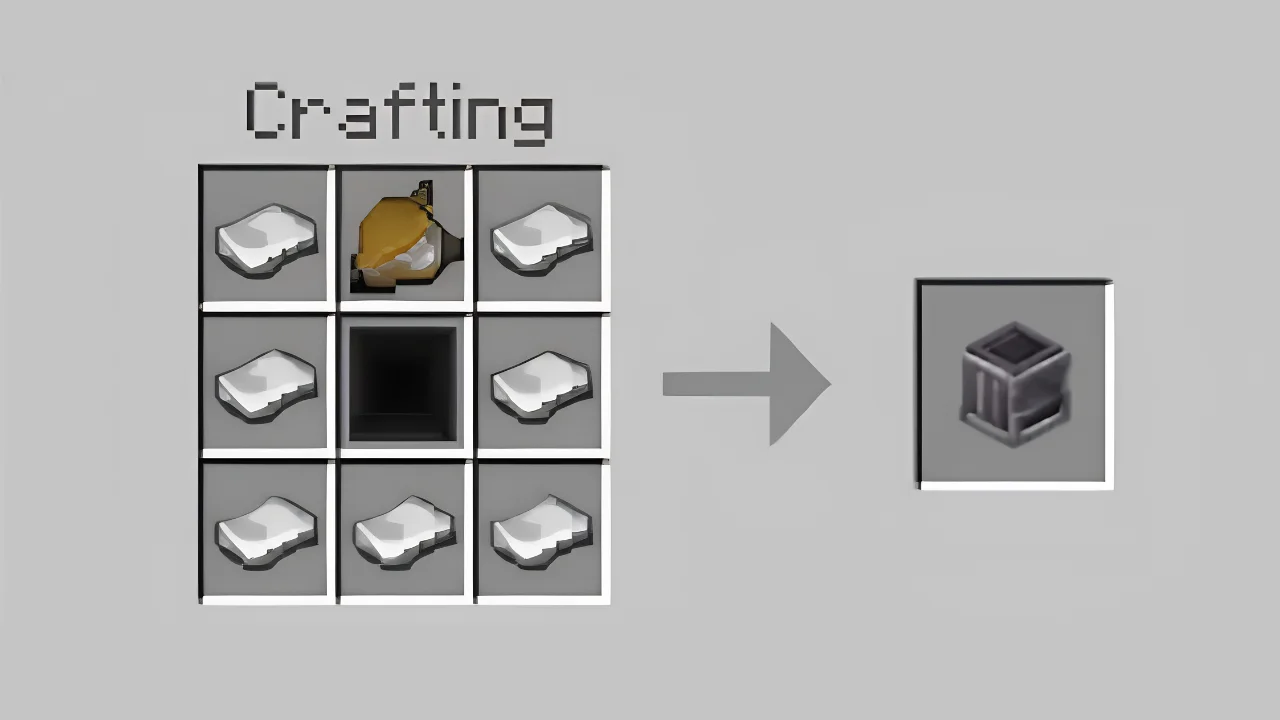
To make bellows you need 2 copper ingots, 5 iron ingots and 1 gold ingot. Search bellows in the crafting table, craft it.
To make a fire chamber, you have to place 1 premial fire ( 4 flint and steel and 1 lava bucket ) and 8 nether bricks around it.
For using it you just have to place it, now a fire from it will start to come out fiercely, you can simply drop whichever item you want to smelt or cook in that fire and it will be smelted or cooked.
You can also use it to make an automatic stone generator by just attaching it with the cobblestone generator, cobblestone comes on a conveyor, on its side is a rocket furnace, it gets smelted and drops into your chest through a hopper.
Block Placer
For making block placer you need 2 lapis lazuli, 1 hopper, 1 dispenser, 1 observer, 1 redstone comparator, 2 iron ingots, and 1 premial fire. Arrange this stuff like this:
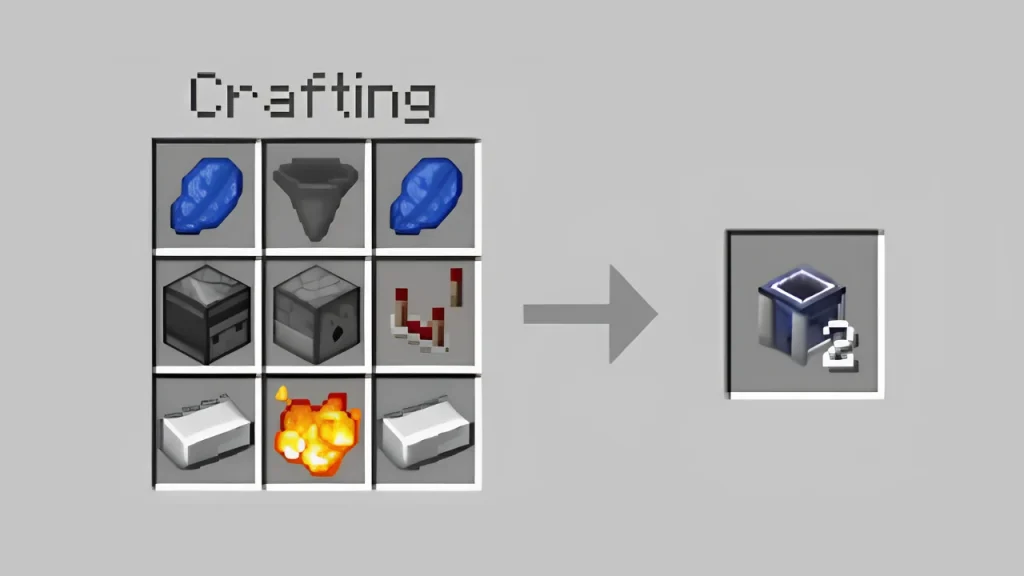
A block placer is a machine which just places a block on its side. Whichever block you drop on it, it is placed on its side and after the block is placed, another block cannot be placed till that one is broken. Its use seems to be less, but it can still be used in traps or something else i think.
Item Grabber
Item grabber is something interesting, it takes out items from the chests and shoots it out. For making it you would need 4 gold ingots, 2 shafts, 1 slime, 1 sticky piston and 1 premial fire. Arrange like it in crafting table:
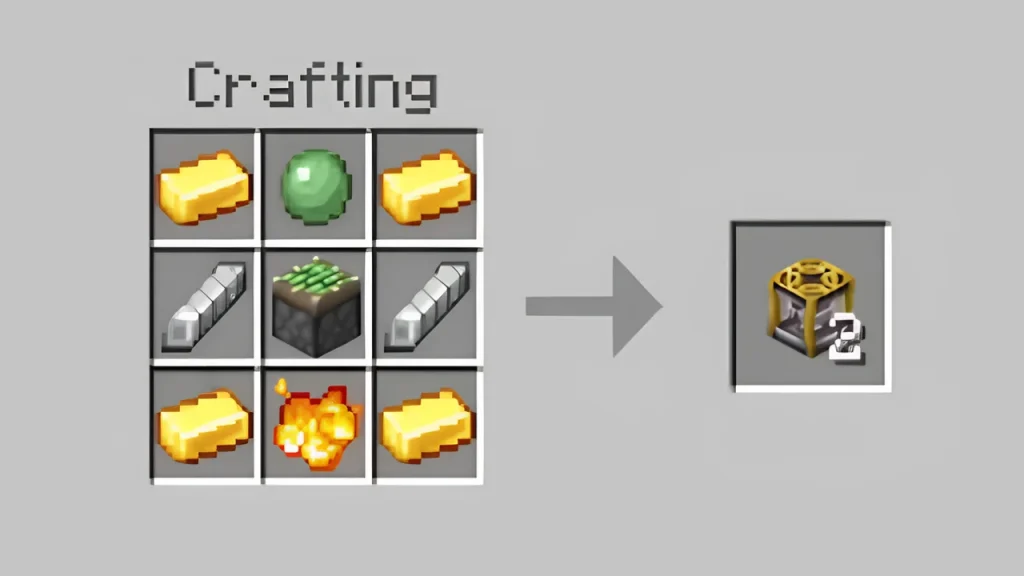
For setting up an item grabber, you need to place it on the side of a chest, barrel or a furnace. Now whichever thing you fill in the chest and barrel it will start coming out, and in the case of the furnace the smelted or cooked items will also start to come out.
For example, cobblestone comes from a conveyor and gets dropped on a hopper, through the hopper it goes into a furnace, the furnace smelted it and an item grabber on its side shoots it out on the other conveyor.
Another example, your sheep farm is far, so in farm you placed item grabber, connected it to conveyor from there to your house, so you can simply throw wheat on conveyor and it reaches to your sheeps.
Automatic Crafting Table
The automatic crafting table is the same as the crafting table, it just feels cool to craft in it. For crafting it you would need 1 crafting table, 2 hoppers, 2 redstone comparators, 1 crafter, 2 quartz and 1 premial fire. Arrange like this:
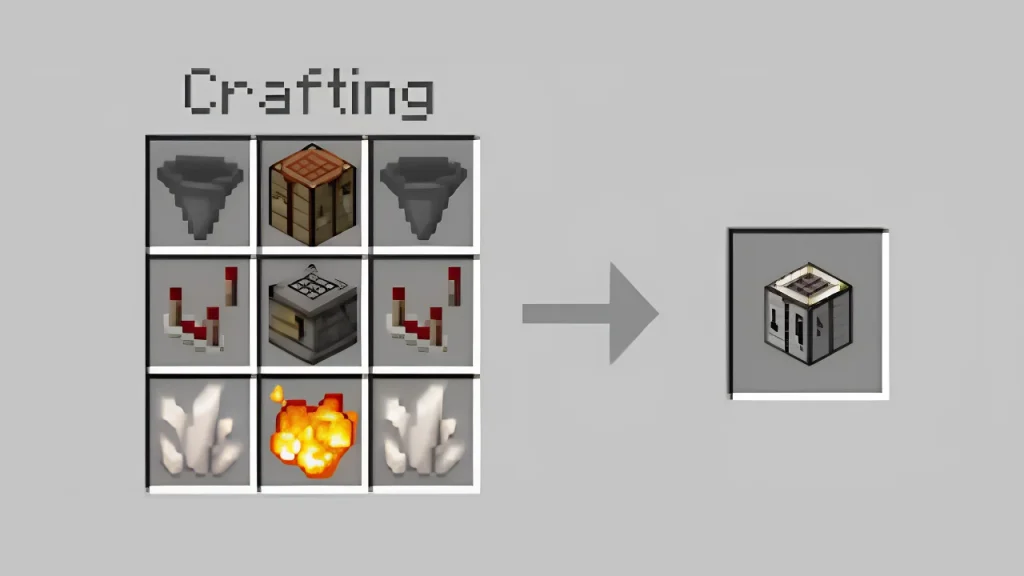
For setting it up you have to place it, and then connect a conveyor behind. As you place it, you would see 9 item frames, just like you put items in your crafting table slots you can put here, like you put oak wood in one item frame and on the conveyor you got 4 wooden planks, but there is a twist, it will only come out if on top is the block which matches the one that gets out, like there should be wooden plank on top, before you craft wooden planks. This feels weird but at the same time looks better.
Crusher
Next we have a crusher, another machine which crushes the items in pieces, for example, if you drop an iron block in a crusher, it crushes that block and gives out iron ingots.
For making a crusher you would need 2 spike plates, 2 sticky pistons, 2 iron gears and 1 reinforced shaft. Arrange these items like this:
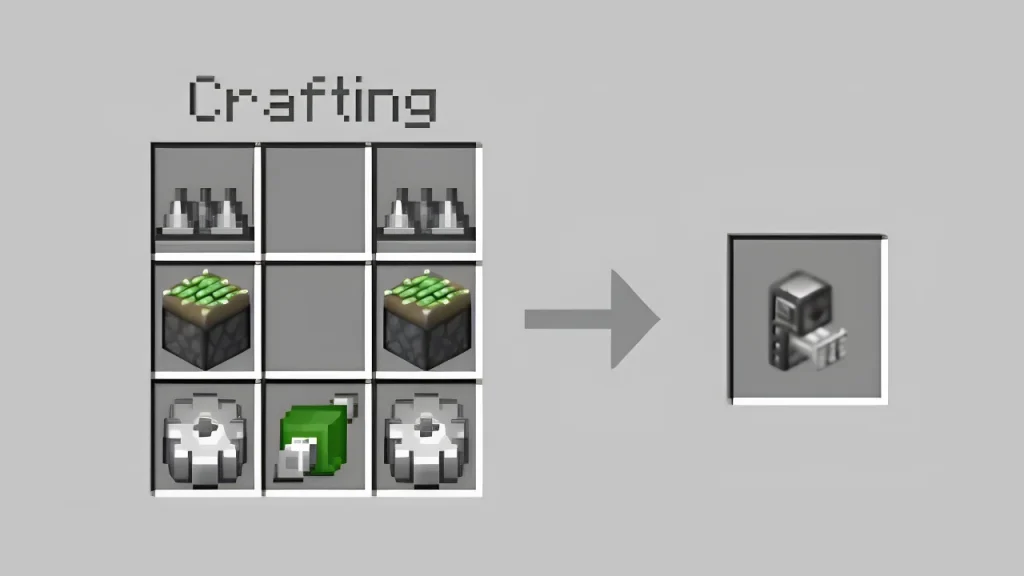
A reinforced shaft can be simply crafted by placing 3 power shafts in second column and 1 bamboo on top middle slot and 1 bamboo on lower middle slot.
Now to set up crusher you would need to make a full power supply system, for it you have to place water above 5 blocks and when water comes down, place 4 water wheels around the water all attached with gear boxes and power shafts, and then attach some power shafts on the front side of this system. Now our power supply system is ready and its time to attach crusher with the power shaft carrying energy. Place the crusher just on the diamond coloured side of the power shaft connected to the power supply and it will start to work.
It is hard to explain this in words, you can watch a video of people popular for giving information about addons like eckosoldier and bedrock princess.
As the crusher is working, you can drop whichever item you want to crush, such as crushing diamond gives diamond dust, crushing wool gives 4 strings, and different items give different stuff.
In the guidebook, in the info button, scroll to the crusher button, there you will see the recipes icon, click it. There will be things listed with names and output items after the original items are crushed. You will get to see the list like this:
Quarry
Quarry is an ultimate mining machine and needs too much power to work. For making it you would need 2 belt drives, 1 mining frame, 1 timing mechanism, 1 drill head, 2 gear box and 2 diamonds. You can find these recipes in the crafting table.
Now arrange this stuff in a crafting table like this:
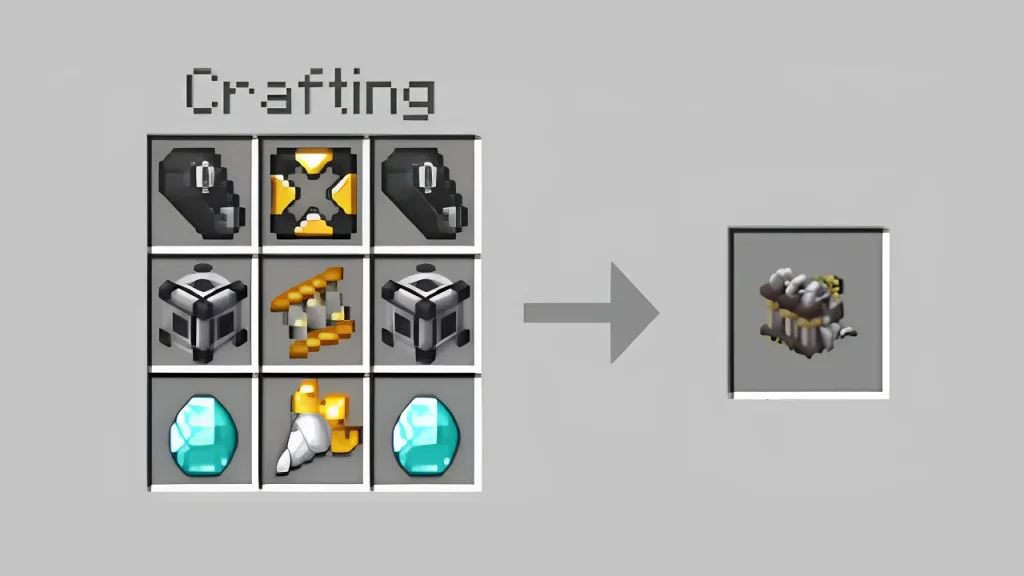
Now, as you would need so much power, your power supply system should be strong enough to provide as much power as the quarry needs to work.
Estimately you would need 4 windmills working on height of 10 blocks and 4 on another 10 blocks, linking this with a water wheel system, with water on top of 5 blocks, and 4 water wheels attached with it. This will provide enough power for a quarry to run.
Link this power system with quarry with power shafts, the power shaft should be attached with diamond coloured part. As you link it, it will start working.
It is hard to explain this in words, you can watch a video of people popular for giving information about addons like eckosoldier and bedrock princess.
Now crouch and click on the quarry, click on size option, and set width and depth which you want to mine. After some minutes, it will start to mine that part. That’s how a quarry works.
All ores which are mined will shoot out from the back of a quarry, from where you can collect the mined stuff.
Wrench
Our last machine is a wrench and with a very simple task, if you want to know what is inside an automatic crafting table or a block placer, you can simply click them by holding the wrench.
Recipes of some important items and their use
Gear box
It is used in most automated systems, it links power shafts and machines with each other. For making it, in a crafting table, you have to place 1 polished diorite in the center slot, and place 4 iron gears, one on its top, one on right, one on left and one downside of it.
Premial fire
Premial fire is used in crafting machines including block breaker, rocket furnace, block placer, item grabber and automatic crafting table. It can be made in a crafting table, by placing 1 lava bucket in the center slot, and around it 4 flint and steels, one on top slot, one left slot, one right slot and one downside.
Conclusion
At last this addon allows you to create very fun and interesting automated systems, which you can use for getting items in big quantities, like if you want so many cakes, you can make an automated cake generator, available in factory blueprints. It is useful and recommended for players who love automation and want to create factories in Minecraft for real.
For more add-on reviews and information you can search our name on google chrome mineecrftapkmod.com, this will navigate you to our site, from where you get minecraft apk download and these reviews on the guides page. Okay, see you, in another joyful blog.